A marketplace lives on the trust buyers place in its sellers. When a seller says it's a company, the first thing worth knowing is whether that company exists, under that name and number, and whether it's still active. Official business registers answer exactly that, and nothing more. This post shows where a register check fits in seller sign-up, what to compare, and where its answers stop.
What you'll learn
- Why marketplaces check business sellers at all
- What to ask a seller for at sign-up
- What the register confirms, and how to compare it
- What the register can't tell you
- How to handle sellers the sources don't cover, and how to keep a record
Why check business sellers?
There are three common reasons, and most marketplaces have all three.
Buyers need to know who they buy from. A buyer who has a problem with an order needs a real business on the other side: a legal name, an address, a way to reach it. A seller account with a trading name and nothing behind it doesn't give them that.
The law may ask you to. In the European Union, the Digital Services Act (Regulation (EU) 2022/2065) has an article on the traceability of traders, Article 30. In short, online platforms that let consumers conclude distance contracts with traders must obtain certain information from those traders before they can sell, including, where the trader is entered in a trade register, that register and the trader's registration number. The platform must also make reasonable efforts to assess whether the information is reliable, and the article mentions freely accessible official online databases as one way to do so. Read the article itself and take legal advice for your case: this post describes a practice, not your obligations.
Business sellers and private sellers are treated differently. Many marketplaces apply different rules, fees or tax treatment to sellers who trade as a business. Knowing that the business really is registered is a natural part of that.
What to ask for at sign-up
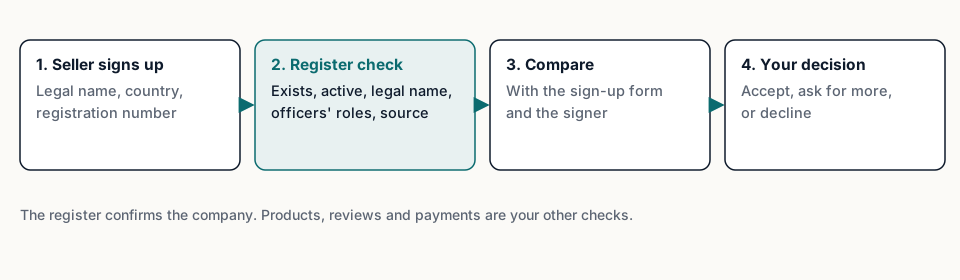
Keep the form short, but ask for the fields a register can confirm:
- The legal name, as registered. Not the shop name, which can differ.
- The country where the company is registered.
- The official number: in France the SIREN (nine digits) or the SIRET of an establishment.
- The registered address.
For Spain, plan differently. The BORME, the official gazette Fuentio reads for Spanish companies, doesn't include the tax number, so a Spanish company can't be checked by its NIF or CIF. Ask for the legal name and province, and match by name.
What the register confirms
With the number, one lookup returns the record as the register holds it. Compare it field by field with the sign-up form:
- Does the company exist under that number? A number with wrong check digits is caught before any lookup: the French SIREN has a check digit, for example. A well-formed number with no public record is worth a second look.
- Is it active? In France, a closed company is shown as ceased, with the date the register gives. In Spain, the status follows the published acts: an extinction closes the company, a dissolution opens its liquidation, and a company with no status act is shown as unknown.- Does the legal name match? Small differences are normal (punctuation, abbreviations of the legal form). A completely different name isn't.
- Does the address match? A seller may ship from a warehouse, but the registered address is the company's legal one.
- Who signs? Registers often publish the officers' names and roles. If the person signing up says they're a director, the register can show whether that role exists. Use those names only as data-protection law allows, and only for that purpose.
When everything matches, the seller goes on to your other checks. When something doesn't, a person looks at it with the source in hand. Don't refuse automatically on a small difference; do ask.
What the register can't tell you
This is the part most worth being clear about, internally and with your users:
- Whether the seller is honest. A real, active company can still sell counterfeit goods or fail to deliver. The register confirms identity, not behaviour.
- Whether the person signing up works for the company. A legal name and number can be copied from a public register. Comparing the signer with the officers' roles, and checking the payout account belongs to the company, are separate steps.
- Its finances. A register check gives no accounts and no rating.
- Its products or reviews. Those are your marketplace's own checks.
So treat a register match as one strong piece of evidence, not a verdict. The decision to accept a seller stays with your team.
Sellers the sources don't cover
No source covers every company in the world, and an automated check should say so instead of failing quietly.
Fuentio covers France (the full public register) and Spain (companies with a BORME act since 6 October 2025). See what we cover.
For a seller outside those sources, plan a manual path: the seller uploads an extract from its official register, and a person checks it against that register's public search. A "not found" in a partial source means "not in the sources we cover", never "this company doesn't exist".
Keeping a record of the check
When a buyer, a regulator or your own team asks later how you checked a seller, you want to show the answer as it was. Store, with the seller's account:
- The identifier you checked and the date you checked it.
- What the register said: legal name, status, address.
- The source, its link and its licence, which every Fuentio answer carries in its
provenanceblock. - What your team decided, and why, for the cases a person looked at.
Re-check sellers from time to time, too. Companies close, move and change officers. A check at sign-up says nothing about next year. A periodic re-check of active sellers, or one before large payouts, keeps the record current.
Where to start
Start small: add the legal name, country and number fields to your seller form, check them with one lookup, and send every mismatch to a person. Measure how many sellers need manual review before you automate further.
For the wider picture of company checks at onboarding, read what is KYB. For other places the same check helps, read five uses for company verification beyond KYB.
Limits. A register check confirms that a company exists under a name and number, its status and its registered details, as the register records them. It doesn't say whether a seller is honest, whether the person signing up works for the company, or anything about finances, products or reviews. Fuentio covers France and Spain, not every country. This post isn't legal advice.
Frequently asked questions
Does a register check prove a seller is legitimate?
It proves the company exists and is registered as stated. Whether the seller behaves well is a separate question, answered by your other checks.
Can I check a Spanish seller by its tax number?
Not with Fuentio: the BORME doesn't include the NIF or CIF. Search by legal name and use the province and registered details to confirm.
What if the seller's company isn't in any source?
Ask for an official register extract and check it by hand against that register's public search. Not being in our sources doesn't mean the company doesn't exist.
Should I show officers' names to buyers?
No. Use them only to compare with the person signing up, as data-protection law allows.
Sources
- Regulation (EU) 2022/2065, the Digital Services Act, Article 30 on the traceability of traders: eur-lex.europa.eu
- INSEE, definition of the SIREN number: insee.fr
- The BORME: boe.es/diario_borme