When a payment company, a neobank or a lending platform signs up a business customer, one early step is always the same: confirm that the company exists, under the name and number it gave, and that it's still active. Done by hand, that means opening a register website, typing a number, reading the page and copying what it says. It's simple work, repeated for every merchant. This post looks at how to automate that one step, which cases to leave to a person, and what to keep.
What you'll learn
- Where the register step sits in merchant onboarding
- What an automated check can match, field by field
- How to sort clear matches from cases that need a person
- What the register step doesn't cover
- What to store so the check can be shown later
Where the register step sits
Merchant onboarding usually has several checks, run by different teams or tools:
- The company: does it exist, is it active, what are its legal name, number, form and registered address?
- The people: who runs and owns it, and are the people you deal with who they say they are?
- The activity: what does the merchant sell, and is it a business you accept?
- The money: does the payout account belong to the company, and what are the expected volumes?
- Screening: sanctions and other lists, as your policy requires.
The register step is the first of these, and the others build on it. If the company isn't what the form says, nothing after it is reliable. That's why it's worth getting right, and also why it's a good candidate for automation: the question is narrow and the source is official.
For regulated firms in the EU, the anti-money-laundering rules ask you to identify a customer and verify its identity on the basis of reliable and independent sources. An official register is the obvious one for a company. How much of that a register check covers for your firm is a question for your compliance team; we look at it more closely in how company checks support AML reviews.
What an automated check can match
Take the fields from your application form and compare them with the register's answer:
- Identifier. Check its format and check digits first, before any request. A French SIREN has a check digit, so most typing errors are caught locally. Then look the company up by that number.
- Legal name. Normalise both sides before comparing: case, punctuation, accents, the legal form written out or abbreviated. Then compare. An exact match after normalisation is clear; a partial one isn't.
- Status. Accept only the statuses your policy allows. Note that "unknown" is a real answer: for a Spanish company with no status act in the BORME, the source doesn't state one. Treat unknown as "needs a person", not as active.
- Registered address. Compare postal code and town at least. Many merchants trade from a different address, so a mismatch here is a question, not a refusal.
- Legal form. Useful when your policy treats forms differently, for example sole traders and companies.
- Officers' roles. Where the register lists them, check that the person applying holds the role they claim. Use names only for that comparison, as data-protection law allows.
For Spain, the register step works differently. The BORME doesn't include the tax number, so you can't look up a Spanish company by its NIF or CIF. Search by legal name, then confirm with the province and the registry sheet before you treat it as a match.
Sorting clear cases from the rest
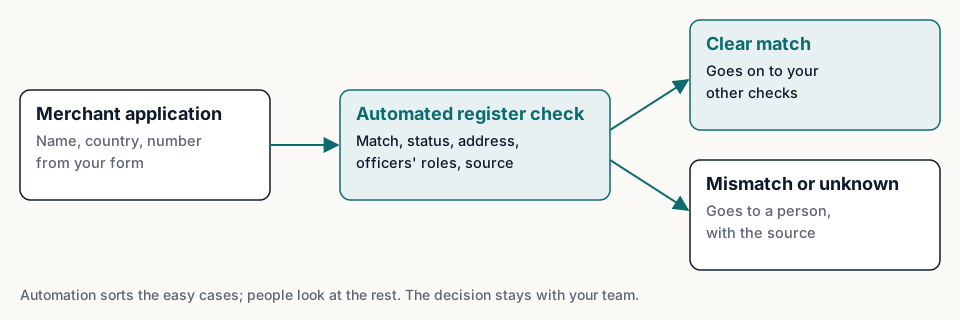
The point of automation isn't to decide. It's to sort, so people spend their time on the cases that need them.
A simple rule set works well to start:
- Clear match: valid identifier, record found, legal name matches after normalisation, status allowed. The merchant goes on to your other checks, with the register answer attached.
- Needs a person: name differs, address differs, status unknown, several candidates from a name search, or the source answered from a stored copy because it was unavailable (the answer says so). A person looks at it with the source link in hand.
- Stop and ask: invalid identifier, or a status your policy doesn't accept, such as a ceased company. Ask the merchant to correct or explain.
Keep the rules in one place, versioned, so you can show which rules applied when. Change them when your manual-review queue tells you to: if one rule sends many clear cases to people, it's too strict; if reviewers keep finding problems in the "clear" group, it's too loose.
What automation saves is typing and copying, and it makes every check the same. It doesn't remove the need for judgement on the hard cases, and nothing here promises a particular onboarding time.
What the register step doesn't cover
Be clear with your team about where this step ends:
- Ownership. Who owns or controls the company isn't in our sources. That's a separate check.
- Finances. No accounts and no ratings.
- Fraud. The wrong person can still act in the name of a real, active company. Confirming the applicant's link to the company is a separate step.
- Screening. Sanctions and other lists are separate checks.
- Coverage. Fuentio covers France (the full public register) and Spain (companies with a BORME act since 6 October 2025). See what we cover. For merchants outside those sources, keep a manual path with the official register's link; a "not found" in a partial source means "not in the sources we cover", never "doesn't exist".
What to keep
Each register check should leave a record that someone else can understand a year later:
- The identifier checked, the time of the check and the result.
- The register's answer as it was: legal name, status with its date, address.
- The source, its link, its licence and when it was last verified, all in the
provenanceblock of every Fuentio answer. - Which rule sorted the case, and for manual cases, who reviewed it and what they decided.
Re-check active merchants on a schedule your policy sets. Companies close and change; a status that was active at onboarding may not be next year. For Spanish companies, the history of BORME acts shows what changed and when.
Getting started
- List the fields your application form already collects, and add the official number if it doesn't.
- Write down your sorting rules: what counts as a clear match, what goes to a person, what stops.
- Run the check on a sample of past merchants and compare the result with what your reviewers decided by hand.
- Adjust the rules, then switch them on for new merchants, with the manual queue in place from day one.
For the wider picture of business onboarding, read what is KYB.
Limits. The register step confirms a company's existence, legal name, status and registered details as the register records them. It doesn't say who owns the company, gives no finances or screening results, and it doesn't prove the applicant acts for the company. Fuentio covers France and Spain, not every country. The decision on a merchant stays with your team. This post isn't legal advice.
Frequently asked questions
Can the register step be fully automated?
The sorting can. The clear cases go straight on to your other checks; the rest go to a person. The decision stays with your team.
What should happen when the status is unknown?
Send the case to a person. Unknown means the source doesn't state a status, not that the company is active.
How do I check a Spanish merchant without its tax number?
Search by legal name, then confirm with the province and the registry sheet. The BORME doesn't include the NIF or CIF.
How often should I re-check merchants?
As often as your policy says. Many teams re-check on a schedule and before large or unusual payouts.
Sources
- Directive (EU) 2015/849 on the prevention of the use of the financial system for money laundering or terrorist financing: eur-lex.europa.eu
- INSEE, definition of the SIREN number: insee.fr
- The BORME: boe.es/diario_borme