In Spain, a company's changes are published one by one in the BORME: its incorporation, new officers, removals, a move, a capital change, a dissolution, an extinction. Reading them in order tells you what happened to a company and when. This tutorial does that through the Fuentio API: find the company, look it up by its registry sheet, then read its history as dated events, each with a link to the official page.
What you'll learn
- How to find a Spanish company by name and pick the right result
- How to look it up by its registry sheet (hoja)
- How to read its BORME acts as a history, with dates and links
- How status follows from the acts
- What the source can't give you, and how to handle it
Before you start
You need a Fuentio API key in an environment variable:
curl -X POST https://api.fuentio.com/v1/keys
export FUENTIO_API_KEY="the key you received"
Fuentio holds the Spanish companies with a part A act in the BORME since 2 January 2009. If you need the background on the BORME itself, read the Spanish BORME explained first.
Step 1: Find the company by name
The BORME has no tax number, so you can't start from a NIF or CIF: start from the name (2 units):
curl "https://api.fuentio.com/v1/companies/search?country=ES&q=qilovatio" -H "Authorization: Bearer $FUENTIO_API_KEY"With Python (httpx):
import os, httpx

H = {"Authorization": f"Bearer {os.environ['FUENTIO_API_KEY']}"}
r = httpx.get("https://api.fuentio.com/v1/companies/search", params={"country": "ES", "q": "qilovatio"}, headers=H)
for c in r.json()["data"]:
    print(c["id"], c["name"]["original"], c["status"]["value"])
With JavaScript (fetch):
const H = { Authorization: `Bearer ${process.env.FUENTIO_API_KEY}` };
const res = await fetch("https://api.fuentio.com/v1/companies/search?country=ES&q=qilovatio", { headers: H });
for (const c of (await res.json()).data) console.log(c.id, c.name.original, c.status.value);
Each result's id ends with its registry sheet, for example ES-RMHOJA-B-643957: the province prefix (B for Barcelona) and the sheet number. When several companies share a name, the sheet and the province tell them apart.
Step 2: Look the company up by its sheet
One unit:
curl https://api.fuentio.com/v1/companies/ES/B-643957 -H "Authorization: Bearer $FUENTIO_API_KEY"r = httpx.get("https://api.fuentio.com/v1/companies/ES/B-643957", headers=H)
company = r.json()["data"]
print(company["name"]["original"], company["status"])const one = await (await fetch("https://api.fuentio.com/v1/companies/ES/B-643957", { headers: H })).json();
console.log(one.data.name.original, one.data.status);Part of the real record:
{
  "id": "ES-RMHOJA-B-643957",
  "name": {"original": "QILOVATIO ENERGIA IBERIA S.L."},
  "status": {"value": "dissolved", "original_label": "Extinción", "as_of": "2026-05-15"},
  "legal_form": {"original_code": "SL", "original_label": "Sociedad de Responsabilidad Limitada"},
  "incorporation_date": "2025-10-28",
  "capital": {"amount": "5000.00", "currency": "EUR"},
  "provenance": {"source": "es_borme", "coverage_level": "events_only"}
}
coverage_level: events_only reminds you what this is: a record built from published acts, not a full register extract.
Step 3: Read the history
The history endpoint returns the acts Fuentio holds as dated events, newest first, each with its official source (1 unit):
curl https://api.fuentio.com/v1/companies/ES/B-643957/history -H "Authorization: Bearer $FUENTIO_API_KEY"r = httpx.get("https://api.fuentio.com/v1/companies/ES/B-643957/history", headers=H)
for e in r.json()["data"]["events"]:
print(e["date"], e["label"], e["source"]["url"])const h = await (await fetch("https://api.fuentio.com/v1/companies/ES/B-643957/history", { headers: H })).json();
for (const e of h.data.events) console.log(e.date, e.label, e.source.url);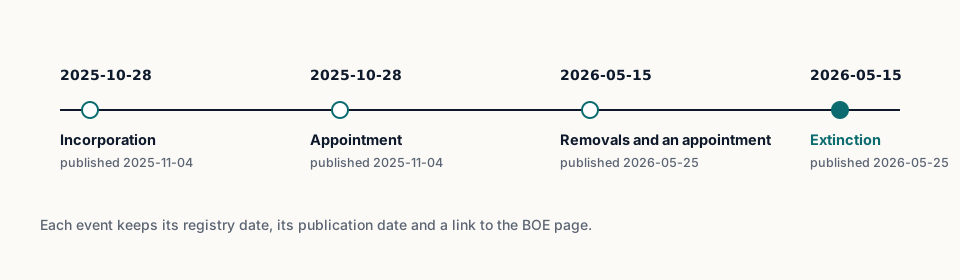
Here is the shape of one event, from the API's recorded example for another company, BAT BATEAN, S.L.:
{
  "date": "2026-10-02",
  "registry_date": "2026-09-25",
  "type": "constitution",
  "label": "Constitución",
  "company_name": "BAT BATEAN, S.L.",
  "people": [],
  "source": {
    "borme_id": "BORME-A-2026-191-01",
    "entry": 439821,
    "url": "https://www.boe.es/diario_borme/txt.php?id=BORME-A-2026-191-01"
  }
}
Two dates, two meanings: registry_date is when the provincial registry registered the act; date is when the BORME published it. The meta part of the answer also gives history_since, the date Fuentio's history for this source starts.
Step 4: Understand the status
The status follows from the acts, never from a guess:
- An Extinción act closes the company: the record shows it closed, with the date.
- A Disolución act opens its liquidation: the company is in liquidation until an extinction follows.
- A company whose only act is its incorporation has no status act: its status is unknown, not "active by default".
For QILOVATIO ENERGIA IBERIA S.L., the history shows exactly that path: incorporated in October 2025, officers changed and the company extinguished in May 2026.
Step 5: Watch for what's missing
Three gaps to handle in your code and your process:
- No act in the window. A company with no part A act since 2 January 2009 isn't in the stream. Search returns nothing for it. That doesn't mean it doesn't exist: check the official registry.
- No tax number. Asking for a NIF or CIF returns the error
id_scheme_not_supported. Search by name instead. - People. Officers are published by law; Fuentio's answers leave their names out, and the act texts too: an appointment or a removal shows only as a dated event with its type. Read the names on the official page, as data-protection law allows.
body = r.json()
if body["error"] and body["error"]["code"] == "id_scheme_not_supported":
    print(body["error"]["hint"])  # e.g. search by name instead
Step 6: Turn the history into answers
A list of acts is raw material. Most teams want a few plain answers from it, and each one maps to a simple rule over the events:
- Has the company closed? Look for an extinction act. If there is one, the company is closed from that date. The record's status already says so; the event gives you the date and the official page to show.
- Is it being wound up? A dissolution act without a later extinction means the company is in liquidation. Treat that as a reason to ask questions before you sign or pay.
- Who are its officers now? Fuentio shows when appointments and removals were published, not who: open each event's BORME entry for the names, and use them only as data-protection law allows.
- Has anything changed since we last checked? Keep the date of your last check, and look only at events published after it. A new act since then (a move, a change of officers, a capital change) is worth a look.
Write these rules down, keep them simple, and keep them in one place, so everyone on your team reads the history the same way. When a case doesn't fit, such as an act type you haven't seen before, send it to a person with the link to the BORME page rather than guessing.
Step 7: Keep a record of what you saw
When you rely on the history for a decision, keep what you saw, as it was:
- The company's
id, and the date you checked. - The events you used, each with its BORME identifier and link.
- The
provenanceblock of the record: the source, its licence and when it was checked.
The BORME pages themselves don't change once published, so the identifier and link are a stable reference. Anyone can open them later and read the same act you read.
Check again before decisions that matter, such as a large order, a new contract or a contract renewal. For a portfolio of Spanish customers or suppliers, a regular pass over everyone's recent events is often enough: most weeks, most companies have nothing new, and the few that do are the ones worth a person's time. A company's history keeps growing, and the act that matters may be the one published last week.
What does it cost?
- Search by name: 2 units.
- Lookup by sheet: 1 unit.
- History: 1 unit.
Errors cost nothing, except not_found on a well-formed identifier. See the pricing page.
For where this fits in a client review, read how company checks support AML reviews; for the other countries, see what we cover.
Limits. The history covers the acts published in the BORME's part A since 2 January 2009, not a company's whole past. You can't look a company up by its NIF, CIF or VAT number. Acts say what was registered; they don't include accounts. No person's name is served: officers, shareholders and sole traders are left out of every answer.
Frequently asked questions
Why is the history empty before a certain date?
Fuentio's Spanish history starts on 2 January 2009; meta.history_since says so in every answer.
What's the difference between date and registry_date?
registry_date is when the registry registered the act; date is when the BORME published it, usually a few days later.
Can a company be "active" with no status act?
Fuentio shows "unknown" until an act says otherwise. The BORME doesn't publish an "active" flag.
How do I find a company if two share a name?
Use the province and the sheet in the id, and the address in each record, to tell them apart.
Sources
- The BORME: boe.es/diario_borme
- The act behind the closure in the example: BORME-A-2026-97-08
- The BOE's reuse conditions: boe.es