You have a French company's number, from a form, an invoice or a contract, and you want to know: is it real, what's its legal name, is it still active? This tutorial does that through the Fuentio API, step by step, with cURL, Python and JavaScript, and shows what to do when something goes wrong.
What you'll learn
- How to check a SIREN's digits before you call anything
- How to look a company up by SIREN, SIRET or VAT number
- How to search by name when you have no number
- How to read the answer, its source and its date
- How to handle each error, and what each call costs
Step 1: Get an API key
Create a free key with one request (100 units a month on the Free plan):
curl -X POST https://api.fuentio.com/v1/keysStore it in an environment variable, never in your code:
export FUENTIO_API_KEY="the key you received"You can also try a few calls without a key: the keyless trial allows 20 units a day per address.
Step 2: Check the number before you call
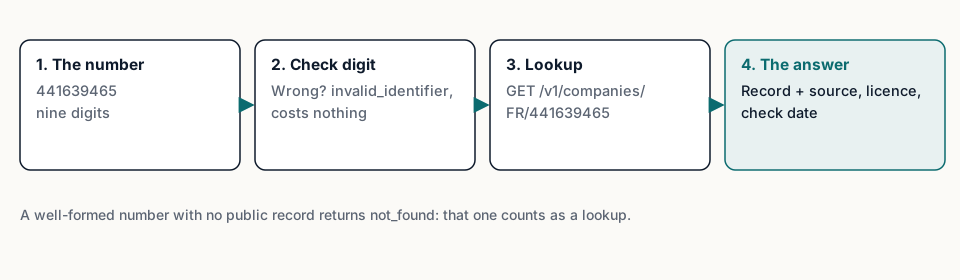
A French company is identified by its SIREN, nine digits. According to INSEE, the ninth digit is a check digit, so most typos can be caught locally, for free. The check is the Luhn algorithm:
def siren_ok(siren: str) -> bool:
    digits = siren.replace(" ", "")
    if len(digits) != 9 or not digits.isdigit():
        return False
    total = 0
    for i, ch in enumerate(reversed(digits)):
        n = int(ch) * (2 if i % 2 else 1)
        total += n - 9 if n > 9 else n
    return total % 10 == 0

print(siren_ok("441639465"))  # Renault: True
print(siren_ok("441639465"[:-1] + "6"))  # last digit changed: False
function sirenOk(siren) {
const d = siren.replace(/\s/g, "");
if (!/^\d{9}$/.test(d)) return false;
let total = 0;
[...d].reverse().forEach((ch, i) => {
let n = Number(ch) * (i % 2 ? 2 : 1);
total += n > 9 ? n - 9 : n;
});
return total % 10 === 0;
}If you skip this step, the API does the same check and tells you, at no cost (see step 6).
Step 3: Look the company up by SIREN
One request, one unit:
curl https://api.fuentio.com/v1/companies/FR/441639465 -H "Authorization: Bearer $FUENTIO_API_KEY"With Python (httpx):
import os, httpx

r = httpx.get("https://api.fuentio.com/v1/companies/FR/441639465",
              headers={"Authorization": f"Bearer {os.environ['FUENTIO_API_KEY']}"})
body = r.json()
company = body["data"]
print(company["name"]["original"], company["status"]["value"], company["provenance"]["source"])
With JavaScript (fetch):
const res = await fetch("https://api.fuentio.com/v1/companies/FR/441639465", {
  headers: { Authorization: `Bearer ${process.env.FUENTIO_API_KEY}` },
});
const { data, meta, error } = await res.json();
console.log(data.name.original, data.status.value, data.provenance.source);
Spaces, dots and dashes inside the number are ignored: 441 639 465 works too.
Step 4: Read the answer
Every answer has the same three parts: data, meta and error. Here is the real answer for Renault, shortened:
{
  "data": {
    "id": "FR-SIREN-441639465",
    "identifiers": [
      {"scheme": "FR_SIREN", "value": "441639465", "primary": true},
      {"scheme": "FR_SIRET", "value": "44163946500091", "primary": false},
      {"scheme": "EU_VAT", "value": "FR63441639465", "primary": false}
    ],
    "name": {"original": "RENAULT"},
    "legal_form": {"original_code": "5510", "original_label": "SA nationale à conseil d'administration", "elf_code": "1NF1"},
    "status": {"value": "active", "original_label": "Active", "as_of": "2025-12-06"},
    "incorporation_date": "2002-04-01",
    "registered_address": {"street": "122 B AVENUE DU GENERAL LECLERC", "postal_code": "92100", "locality": "BOULOGNE-BILLANCOURT", "country": "FR"},
    "activity": {"original_code": "64.20Z", "nace_rev2": "64.20", "label_en": "Activities of holding companies"},
    "provenance": {
      "source": "fr_recherche_entreprises",
      "source_url": "https://recherche-entreprises.api.gouv.fr/search?q=441639465&per_page=1",
      "license": "Licence Ouverte / Etalab 2.0 (Annuaire des Entreprises, INSEE Sirene); officers: INPI RNE reuse licence",
      "last_verified_at": "2026-10-05T14:02:11Z",
      "source_updated_at": "2026-10-05",
      "coverage_level": "full"
    }
  },
  "meta": {"source": "fr_recherche_entreprises", "last_verified_at": "2026-10-05T14:02:11+00:00", "stale": false},
  "error": null
}
The fields to read first:
status.value(active, or a closed state) andstatus.original_label, the register's own word. In France a closed company is "ceased", with the date the register gives.name.original, the legal name as registered.provenance: the source, a link to it, its licence, and when it was checked. Keep it with your record.meta.stale:truemeans the official source wasn't answering and you're getting the last copy we checked, with its date. Decide whether that's good enough for your case.
Step 5: Look up by SIRET or VAT number, or search by name
A SIRET points to an establishment; the API resolves it to the company, since the legal facts belong to the company:
curl https://api.fuentio.com/v1/companies/FR/44163946500091 -H "Authorization: Bearer $FUENTIO_API_KEY"
curl https://api.fuentio.com/v1/companies/FR/FR63441639465 -H "Authorization: Bearer $FUENTIO_API_KEY"
With no number, search by name (two units). Filter by postal code, town or status to narrow it down, and page through results (page_size up to 25):
curl "https://api.fuentio.com/v1/companies/search?country=FR&q=renault&postal_code=92100" -H "Authorization: Bearer $FUENTIO_API_KEY"The search answer's meta tells you total, page, page_size and next_page. When several companies share a name, show the candidates to a person, or ask your user for the SIREN: a name is a label, a number is an identity.
Step 6: Handle every error
Errors use the same envelope, with an error.code from a closed list and a hint for the next step. The ones you'll meet with French numbers:
invalid_identifier(400): the number has the format of a SIREN but its check digits are wrong, for example Renault's SIREN with its last digit changed. Free.not_found(404): a well-formed number with no public record. In France, the company may have opted out of public diffusion. This one costs one unit, because it's a real answer.rate_limited(429): too many requests per second for your plan. Wait the seconds given in theRetry-Afterheader.quota_exceeded(402): your units are used up;error.detailssays your limit and when it resets.upstream_unavailable(503, or 504 when a request runs longer than 30 seconds): the official source isn't answering and there's no earlier copy to serve. Retry later.
body = r.json()
if body["error"]:
    print(body["error"]["code"], "-", body["error"]["hint"])
Except not_found on a well-formed number, errors cost nothing.
Step 7: Put it together in your form
In a real product, these steps usually sit behind a sign-up or supplier form. A simple order works well:
- Check the digits in the browser or on your server as the user types. Tell them at once if the number can't be right; it's the cheapest error to fix.
- When the form is sent, look the company up by the number.
- Compare the answer with what the user typed: the legal name after normalising case, accents and punctuation, and the postal code of the registered office.
- Accept a clear match, and send the rest to a person with the source link: a different name, a ceased company, or a
staleanswer when your use needs today's record.
Don't refuse automatically on a small difference in the name. Companies often write their own name in a shorter or older form than the register. A person looking at both, with the source in hand, decides faster than a rule tuned to every case.
If the user types an establishment's SIRET, you get the company's record. Keep the SIRET too: it tells you which site of the company you deal with, which matters for deliveries and invoices.
Step 8: Keep the answer with your record
When someone asks later how you knew a company was active, you want to show the answer as it was on the day you checked. Store, next to your customer or supplier record:
- The number you looked up, and the record's
id. - The legal name and the status, with the status date the register gave.
- The
provenanceblock: source, source link, licence,last_verified_atandsource_updated_at.
That's enough to show where each fact came from and when, without storing more personal data than you need. Check again from time to time: companies close, move and change their name, and a check from last year says nothing about today.
What does each step cost?
- Lookup by SIREN, SIRET or VAT number: 1 unit.
- Search by name: 2 units.
- The coverage list: free.
See the pricing page for the plans, and what we cover in France and Spain.
For the background on the French numbers, read French company registers explained; for where this check fits in onboarding, read what KYB is.
Limits. The French source has no insolvency proceedings and no capital amount. Companies that opted out of public diffusion aren't in it. No person's name is served: officers, shareholders and sole traders are left out of every answer. There is no search by a person's name. The check tells you what the register records; the decision you take with it stays yours.
Frequently asked questions
Do I need to check the digits myself?
No, the API checks them and returns invalid_identifier for free. Checking locally saves a round trip and catches typos in your own forms.
Why did a well-formed SIREN return not_found?
The company may have opted out of public diffusion, so the official source doesn't publish it. That's a real answer, so it costs one unit.
Can I look up by SIRET?
Yes. The API resolves a SIRET to its company, and returns the company's record with the SIRET among its identifiers.
How fresh is the answer?
Each record carries the time we checked the source (last_verified_at) and the source's own update date (source_updated_at).
Sources
- INSEE, definition of the SIREN number: insee.fr
- INSEE, definition of the SIRET number: insee.fr
- Annuaire des Entreprises: annuaire-entreprises.data.gouv.fr
- Licence Ouverte / Etalab 2.0: data.gouv.fr