Before you sign with a supplier, pay an invoice or open an account for a business customer, one question comes up: does this company still exist? In France, the answer is in the official data, as long as you know where to look and don't confuse the company with one of its establishments. This guide explains the statuses, what "ceased" means, and how to check, by hand and then through an API.
What you'll learn
- Which statuses a French company and its establishments carry
- What "ceased" means, and what it doesn't
- Why a closed establishment is not a ceased company
- How to check by hand on the Annuaire des Entreprises
- How to automate the check, and what to keep
Two levels, two statuses
A French company has two levels of identity. The company itself, the legal unit, has a SIREN. Each of its establishments, meaning each place where it operates, has a SIRET. Both levels carry their own status in INSEE's Sirene directory.
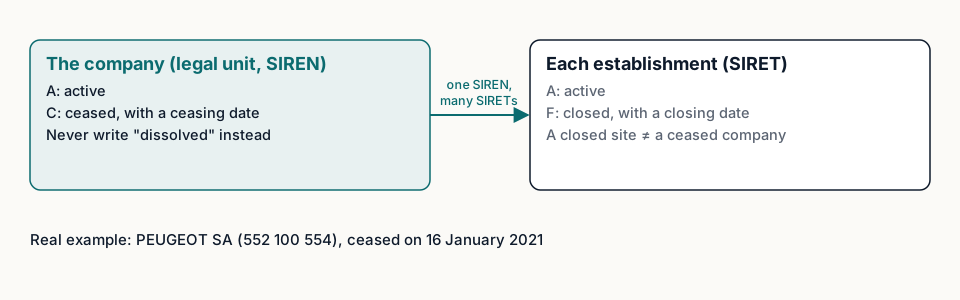
The company is either active (code A in the Sirene data) or ceased (code C), with the date it ceased.
An establishment is either active (A) or closed (F), with its closing date.
You can read these codes directly in the public data, for example in the State's company search API, which powers the Annuaire des Entreprises. A real example: PEUGEOT SA, SIREN 552 100 554, appears there as ceased since 16 January 2021.
What "ceased" means
"Ceased" (cessée) means the company no longer carries on any activity according to the directory, from a given date. It's the French register's own word, and it's the one to keep.
Don't swap it for a word that seems to mean the same thing. A company's dissolution, for example, is a legal step that opens its liquidation: it isn't the same as ceasing, and it isn't what the status says. If you translate or summarise a status, keep the original term next to it. That's what Fuentio does: every answer gives the normalised value and the register's original label.
Two more points to keep in mind:
- Ceased doesn't mean "never existed". A ceased company has a history, a creation date, sometimes years of activity. An old invoice from it isn't fake.
- Active doesn't guarantee anything else. An active company can be in trouble, have no staff left, or not answer the phone. The status says what the register says, nothing more.
A closed establishment is not a ceased company
This is the most common mistake. A company closes a shop, moves its head office, merges two warehouses: the old SIRETs become closed, but the company stays active under its SIREN, with new SIRETs.
So if your customer file stores a SIRET and that SIRET shows as closed, the right question is: has the company ceased, or only that site? To answer it:
- Take the first nine digits of the SIRET: that's the SIREN.
- Check the company's status under that SIREN.
- If the company is active, find its current head office or the site you work with, and update your record with the right SIRET.
The other way round, when the company has ceased, all its establishments are closed too: there's no other site to look for.
Check by hand
The Annuaire des Entreprises is the French State's public company directory. It brings together INSEE's Sirene data and the national register of companies (RNE), kept by INPI. Type the SIREN, the SIRET or the company's name: the page shows the company's status with its date, the head office, and the list of establishments with their own status.
A few precautions:
- Search by number when you have one. A name can match several companies, some of them ceased long ago.
- Look at the date. A recent cessation may not be reflected yet in documents you hold.
- A company you can't find isn't necessarily fictitious. Some companies have asked not to be publicly listed; they don't appear in the directory. Ask them for a registration document.
To understand where these data come from, read the French company registers explained.
Automate the check
For a file of a few hundred customers, or a check at every sign-up, searching by hand doesn't scale. The principle stays the same:
- Check the number offline. The check digit of the SIREN and the SIRET catches most typing errors; see our tutorial on the formats.
- Look the company up by its SIREN, not by its name.
- Read the company's status, then, if you work with a particular site, the establishment's.
- Keep a record: the status, its date, the source and the date of your check.
Fuentio's API will return the normalised status with the register's original label and date, the source and the check date, when it opens. Until then, the public data on the Annuaire des Entreprises already lets you run these checks.
Whichever tool you use, decide in advance what happens with each answer. A simple rule set works for most teams: active company, carry on; ceased company, stop and ask; closed establishment under an active company, update the record; not found, ask for a registration document. Writing it down means two people looking at the same answer make the same decision.
How often should you check again?
A check tells you what was true on the day you made it. For an active customer or a regular supplier, a periodic re-check is usually enough: before a contract renewal, before a large payment, or at a fixed interval for the whole file. What matters is being able to show when the last check happened and what it said.
Re-checking a whole file at once is also a good way to clean it. Ceased companies come out, closed SIRETs get replaced by current ones, and duplicates that were really the same company under two SIRETs become visible. That's useful well beyond compliance: fewer returned letters, fewer invoices addressed to a site that no longer exists.
See what we cover in France and Spain.
Limits. The status shows what the Sirene directory records, as of its last update. It says nothing about finances or insolvency proceedings, which aren't in the French source Fuentio reads. Companies that opted out of public diffusion don't appear in the public data. Not legal advice.
Frequently asked questions
Can a status change after I've checked it?
Yes: a company can cease after your check, and the directory is updated when the formalities are recorded. Always check the current status rather than relying on an old check.
My customer has a closed SIRET. Should I stop working with them?
Not necessarily. Check the company's status under its SIREN first: a closed site doesn't stop the company from being active elsewhere.
Is a Kbis enough to know whether a company is active?
A recent Kbis shows that a commercial company is registered in the RCS. The status in Sirene and the RNE can be checked for free on the Annuaire des Entreprises. To see which document proves what, read our guide to the Kbis and its equivalents.
Why doesn't a company appear at all?
It may have asked not to be publicly listed, or the number was mistyped. Check the number, then ask for a registration document.
Sources
- Annuaire des Entreprises (Sirene and RNE): annuaire-entreprises.data.gouv.fr
- The State's company search API, read on 8 October 2026: recherche-entreprises.api.gouv.fr
- INSEE, definition of the SIRET number: insee.fr